If you are planning to build a website for your business, one of the first questions you may have is:
How much does a WordPress website cost?
There is no single answer.
A simple WordPress website for a freelancer or small business may cost a few hundred dollars, while a professionally designed website with custom functionality or a WooCommerce store can require several thousand dollars.
The reason is simple: a website is not just a collection of pages. The cost depends on the design, functionality, content, technical requirements, integrations, and level of customization you need.
As a WordPress website designer and developer, I often see business owners focus on the number of pages when estimating a website budget. But two websites with the same number of pages can require completely different amounts of work.
In this guide, I’ll break down the main costs involved in building a WordPress website in 2026, what affects the final price, when DIY makes sense, and what you should consider before hiring a WordPress professional.
How Much Does a WordPress Website Cost in 2026?
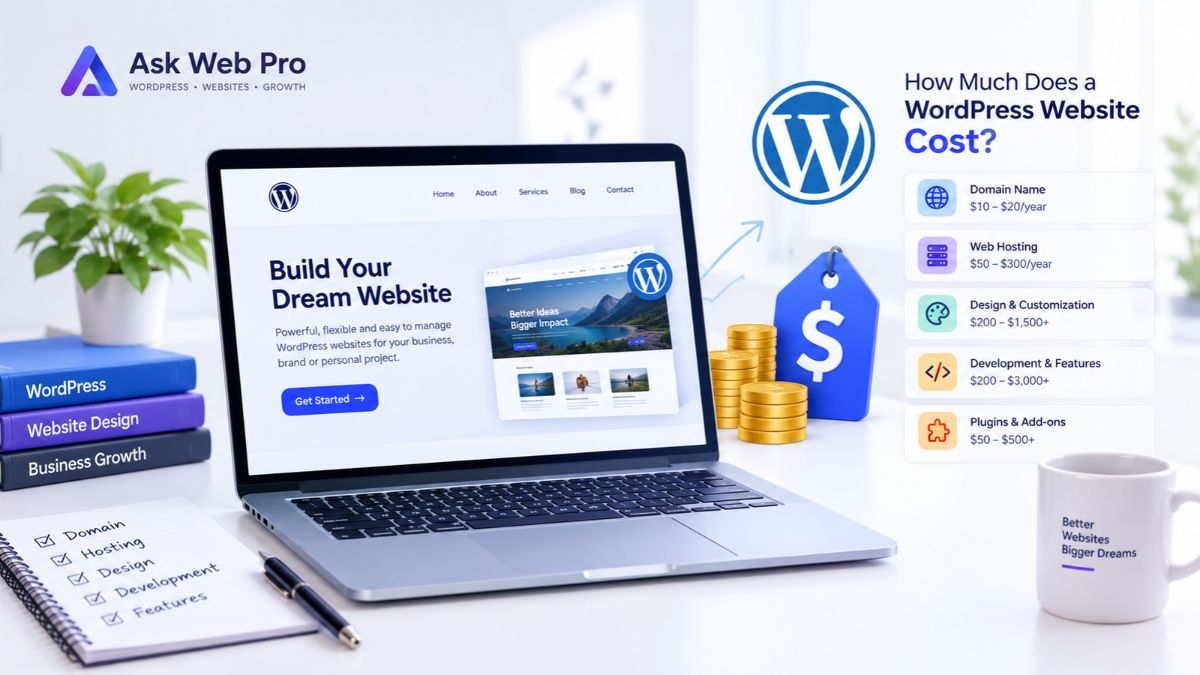
Here is a general starting point for understanding WordPress website pricing:
| Website Type | Typical Project Cost |
|---|---|
| Basic Personal or Portfolio Website | $200–$600+ |
| Small Business Website | $500–$1,500+ |
| Professional Custom WordPress Website | $1,000–$3,000+ |
| WooCommerce / eCommerce Website | $1,000–$5,000+ |
| Advanced Custom WordPress Website | $3,000+ |
These are illustrative project ranges, not fixed industry prices.
The actual cost can vary considerably depending on the developer, location, experience, design requirements, number of pages, functionality, content, integrations, and ongoing support.
For example, a five-page business website with a contact form is very different from a WooCommerce store with hundreds of products, multiple payment methods, shipping rules, customer accounts, and a customized checkout.
So rather than asking only:
“How much does a WordPress website cost?”
it is better to ask:
“What does my website need to accomplish, and what will it take to build it properly?”
That question gives you a much more useful starting point.
Is WordPress Free?
Yes. The WordPress software itself is free and open-source. A self-hosted WordPress website does not require you to purchase a WordPress software license.
However, building and operating a complete website involves more than the software itself.
You may need to pay for:
- A domain name
- Web hosting
- Website design and development
- Premium themes or plugins
- Professional content
- Images or graphics
- eCommerce tools
- Email services
- Maintenance and technical support
So when someone says, “WordPress is free,” that is technically true, but it does not mean a professional website can be built and operated without any costs.
The software may be free. The work required to turn it into a useful business website is not.
What Determines the Cost of a WordPress Website?
Several factors influence the final price of a WordPress project.
1. Domain Name
Your domain is the address people use to find your website, such as yourbusiness.com.
Domain prices vary depending on the extension, registrar, and whether the domain is a standard or premium name.
Compared with development, the domain is usually a relatively small part of the overall budget, but it is still one of the basic costs of running a website.
2. Web Hosting
Your website needs a server where WordPress, your database, images, and other website files can be stored.
Hosting prices vary depending on the resources and service you choose.
A small website with modest traffic may work well with an entry-level hosting plan. A growing website may eventually need better resources, stronger performance, or more scalable hosting.
When comparing hosting, I recommend looking beyond the introductory price.
Consider:
- Server resources
- Storage
- Performance
- SSL support
- Backup options
- Security features
- Customer support
- Renewal pricing
- Scalability
Saving money on hosting is not particularly useful if the website regularly suffers from performance or reliability problems.
3. Website Design
Design is one of the biggest factors affecting the cost of a professional WordPress website.
A basic website may use an existing theme with relatively small adjustments.
A more customized project may require:
- Custom page layouts
- Brand-specific colors and typography
- Custom sections
- Responsive layouts
- Conversion-focused structure
- Custom graphics
- UX improvements
- Mobile and tablet optimization
There is a major difference between “installing a theme and replacing the text” and creating a website around a specific business and its audience.
That difference is reflected in the amount of time required.
4. Development and Functionality
A website also needs to do something.
A simple business website might only require:
- Contact forms
- Service pages
- Blog functionality
- Social links
- Basic navigation
A more advanced website may require:
- Membership systems
- User accounts
- Booking functionality
- Custom forms
- Third-party integrations
- API connections
- Advanced search
- Custom dashboards
- Automated workflows
Every additional feature can affect the development time and final cost.
This is why two WordPress websites with the same number of pages can have very different budgets.
5. Plugins and Premium Tools
One of WordPress’s strengths is its large ecosystem of plugins.
Plugins can add functionality without requiring every feature to be developed from scratch.
Some are free, while others require a paid license.
Depending on the project, you may need tools for:
- Page building
- SEO
- Security
- Forms
- Backups
- WooCommerce
- Memberships
- Email marketing
- Performance optimization
However, more plugins do not automatically mean a better website.
In my experience, it is better to choose tools based on actual project requirements rather than installing plugins simply because they offer additional features.
6. Content and Images
Content is another cost that website owners sometimes overlook.
Someone needs to prepare:
- Page copy
- Service descriptions
- Product descriptions
- Blog articles
- Images
- Graphics
- Videos
- Brand assets
If your content and images are ready before development begins, the project can usually move more smoothly.
If content needs to be researched, written, edited, or organized as part of the project, additional time may be required.
7. eCommerce Requirements
An online store generally involves more functionality than a standard business website.
A WooCommerce website may need:
- Product pages
- Product categories
- Shopping cart
- Checkout
- Payment gateways
- Shipping settings
- Tax configuration
- Customer accounts
- Order management
- Transactional emails
- Coupons
- Inventory management
- Product variations
A small store selling a limited number of products can be relatively straightforward.
A larger store with subscriptions, memberships, advanced product options, custom pricing, complex shipping rules, or third-party integrations can become significantly more involved.
That is why WooCommerce pricing has such a wide range.
8. Maintenance and Support
Launching a website does not necessarily mean the work is finished forever.
WordPress websites may need ongoing:
- WordPress updates
- Plugin updates
- Theme updates
- Security checks
- Backups
- Bug fixes
- Performance improvements
- Content updates
Some website owners prefer to handle these tasks themselves.
Others would rather have a developer take care of the technical side.
The right option depends on your technical knowledge, available time, and how important the website is to your business.
WordPress Website Cost by Website Type
The type of website you are building is another useful way to estimate the required budget.
Personal or Portfolio Website
A personal website or portfolio generally has a relatively simple structure.
It may include:
- Home
- About
- Skills or Services
- Portfolio
- Blog
- Contact
If the design is simple and there is little custom functionality, this type of website can often be built with a modest budget.
However, custom design, animations, advanced portfolio functionality, integrations, or other specialized features can increase the cost.
Small Business Website
A small business website needs to do more than simply display information.
It should make it easy for visitors to understand:
- What the business offers
- Who it serves
- Why they should consider it
- How they can get in touch
A typical small business website might include service pages, an About page, testimonials, portfolio or case study sections, a blog, contact forms, and a basic SEO foundation.
For a business website, I would generally focus less on simply counting pages and more on whether each page has a clear purpose.
A well structured five page website can be more effective than a poorly structured fifteen page website.
Professional or Corporate Website
A larger professional website may require a stronger visual identity and more advanced functionality.
It may include:
- Multiple service categories
- Case studies
- Team profiles
- Resource sections
- Blog
- Lead-generation forms
- Third-party integrations
- Advanced navigation
- Custom landing pages
As the website architecture becomes more complex, planning and development requirements increase.
WooCommerce Website
WooCommerce can turn WordPress into a complete online store.
A basic store can be relatively straightforward, but more complex stores may require substantial customization.
For example, a store may need:
- Custom product layouts
- Product filtering
- Product variations
- Subscriptions
- Memberships
- Custom checkout
- Payment integrations
- Shipping rules
- Automated workflows
The more business logic involved, the more important it becomes to define the scope before development begins.
Custom WordPress Website
A highly customized WordPress website can go well beyond a standard theme setup.
Custom development may be required for:
- Unique layouts
- Custom post types
- Advanced filtering
- Third-party integrations
- Custom dashboards
- Specialized workflows
- API integrations
- Custom WordPress functionality
For these projects, I would not recommend trying to estimate the price simply by saying “I need a WordPress website.”
The better approach is to define the functionality first and then estimate the development work required.
DIY WordPress Website vs Hiring a Professional
Another important question is whether you should build the website yourself or hire a professional.
There is no universally correct answer.
Building It Yourself
DIY can be a good option if:
- You have a limited budget
- Your website is relatively simple
- You have enough time to learn
- You enjoy working with technology
- You do not need extensive customization
The biggest advantage is that you can reduce direct development costs.
But there is another cost that is easy to overlook: your time.
You may spend hours learning how to configure themes, create layouts, fix responsive issues, troubleshoot plugins, optimize images, improve page speed, and solve unexpected WordPress problems.
If you enjoy that process, DIY can be a good learning experience.
If your time is better spent running your business, hiring a professional may make more sense.
Hiring a Professional
Hiring a WordPress designer or developer can be worthwhile when:
- Your website represents an established business
- You need a custom design
- You have a deadline
- You need specialized functionality
- You do not want to handle technical problems yourself
- You need WooCommerce development
- You want ongoing support
The value of professional development is not simply the number of pages created.
A good professional should help turn your requirements into a website that is usable, responsive, maintainable, and appropriate for your audience.
What Should a Professional WordPress Website Include?
A professional website does not need every possible feature.
It needs the right features for its purpose.
Depending on the project, these may include:
Responsive Design
The website should work properly across desktop, tablet, and mobile devices.
Clear Navigation
Visitors should be able to find important information without having to figure out a complicated menu.
Strong Page Structure
Content should be organized logically, with clear headings, readable sections, and useful calls to action.
Contact or Lead Forms
If the purpose of the website is to generate enquiries, visitors need an easy way to contact the business.
SEO-Friendly Structure
The website should have a sensible structure that helps search engines understand the site’s pages and content.
Performance Considerations
Images, scripts, plugins, and other page elements should be handled carefully to avoid unnecessary performance problems.
Security and Maintenance
WordPress core, themes, and plugins should be maintained properly, with appropriate backup and security practices.
Analytics and Search Monitoring
Depending on the website’s needs, analytics and search monitoring can help you understand how visitors discover and use the site.
How to Get an Accurate WordPress Website Quote
If you ask three developers, “How much does a WordPress website cost?”, you may receive three very different answers.
That does not automatically mean one developer is overcharging.
The project scopes may simply be different.
Before requesting a quote, prepare a basic project brief.
1. Explain the Purpose
Start by explaining what you want the website to accomplish.
For example:
- Generate leads
- Sell products
- Display a portfolio
- Publish educational content
- Promote a service
- Establish an online presence
2. List the Main Pages
You do not need a perfect sitemap before contacting a developer.
An approximate structure is enough.
For example:
Home → About → Services → Portfolio → Blog → Contact
3. Mention eCommerce Requirements
If you want to sell products or services online, mention this from the beginning.
WooCommerce requirements can significantly change the scope of a project.
4. Explain What You Already Have
Tell the developer whether you already have:
- Logo
- Brand guidelines
- Website copy
- Images
- Product information
- Videos
- Existing website
This helps the developer understand how much preparation is required.
5. Mention Special Functionality
Do not assume that a particular feature is automatically included.
If you need bookings, memberships, integrations, custom forms, advanced filtering, or another special feature, explain it clearly.
6. Decide Whether You Need Ongoing Support
If you want help with updates, maintenance, troubleshooting, content changes, or optimization after launch, mention this when discussing the project.
The more clearly you describe your requirements, the easier it becomes to receive a realistic quote.
How to Choose the Right WordPress Developer
Price matters, but it should not be the only thing you compare.
When evaluating a developer, look at their:
Portfolio
Does their previous work match the quality and style you want?
Relevant Experience
If you need WooCommerce, look for genuine WooCommerce experience.
If you want an Elementor website, check whether the developer has actually built websites with Elementor.
Communication
Can they explain technical decisions clearly?
Do they understand your requirements before talking about price?
Project Scope
Make sure you know exactly what is included.
Ask about:
- Number of pages
- Design
- Revisions
- Functionality
- Responsive optimization
- SEO basics
- Testing
- Launch support
Ownership and Access
Make sure you retain appropriate access to your domain, hosting, website, and other important accounts.
This is particularly important for a business website.
Support After Launch
Ask what happens if you discover a problem after the website goes live.
Some developers include a limited support period, while others provide ongoing maintenance separately.
Don’t Automatically Choose the Cheapest Quote
A low quote may look attractive, but it may not include the same level of design, functionality, testing, or support.
Instead of asking:
“Who is the cheapest?”
I recommend asking:
“Who offers the right combination of experience, quality, communication, scope, and value for my project?”
Frequently Asked Questions
Can I build a WordPress website for free?
You can use the free WordPress software, but a complete website normally involves other costs such as hosting, a domain, premium tools, professional services, or content creation.
Is WordPress cheaper than hiring a web developer?
WordPress is free software, but the total cost of a website depends on what you build.
You can reduce development costs by building the website yourself, but you will invest your own time in learning, designing, configuring, troubleshooting, and maintaining it.
How much does a small business WordPress website cost?
A small business WordPress website can commonly fall somewhere in the hundreds to low thousands of dollars, depending on the number of pages, design requirements, functionality, content, and development requirements.
A simple informational website will generally require less work than a highly customized business website.
How much does a WooCommerce website cost?
WooCommerce projects can range from relatively simple stores to highly customized eCommerce websites.
A basic store may require a modest budget, while a store with custom product functionality, complex checkout requirements, subscriptions, integrations, or specialized business rules can cost several thousand dollars or more.
Do I have to pay for WordPress every month?
You do not pay a monthly license fee for self-hosted WordPress itself.
However, you may have recurring costs for hosting, domain renewal, premium plugins, themes, email services, maintenance, or other third-party services.
How much does WordPress website maintenance cost?
Maintenance pricing varies depending on what is included.
Basic maintenance may involve updates and backups, while a more comprehensive service can include security checks, troubleshooting, content changes, performance work, and ongoing technical support.
What affects the price of a WordPress website the most?
The biggest factors are usually:
- Design complexity
- Number of pages
- Custom functionality
- eCommerce requirements
- Third-party integrations
- Content requirements
- Development time
- Ongoing support
That is why getting a quote based on your actual requirements is usually more useful than comparing generic WordPress package prices.
Final Thoughts
There is no universal price for a WordPress website.
A simple personal website can be relatively affordable, while a custom business website or WooCommerce store may require a much larger investment.
The most important thing is not to choose a website based on price alone.
Start by deciding what you want the website to accomplish.
Then consider the design, functionality, content, eCommerce requirements, integrations, maintenance, and long-term needs.
From the WordPress projects I work on, I have found that the clearest projects usually start with a clear understanding of the problem the website is supposed to solve.
Once that is clear, it becomes much easier to decide what should be included, what can be left out, and where your budget should go.
A good website should not simply look professional when it launches. It should be easy for visitors to use, practical for the business owner to manage, and flexible enough to evolve as the business grows.
If you are planning a WordPress project, you can explore my WordPress Website Design & Development service to see what I offer.
You can also view my portfolio to see examples of WordPress projects I have worked on.
And if you already have an idea in mind, you can get a free quote and tell me what you are planning. You do not need to have every technical detail figured out before getting started.